

Download Dorayaki 1.0.13 — Free WordPress Theme
in Themes , Web Templates , WordPress , Wordpress Plugin , Wordpress Theme on May 28, 2026Choose Your Desired Option(s)
Dorayaki — Overview
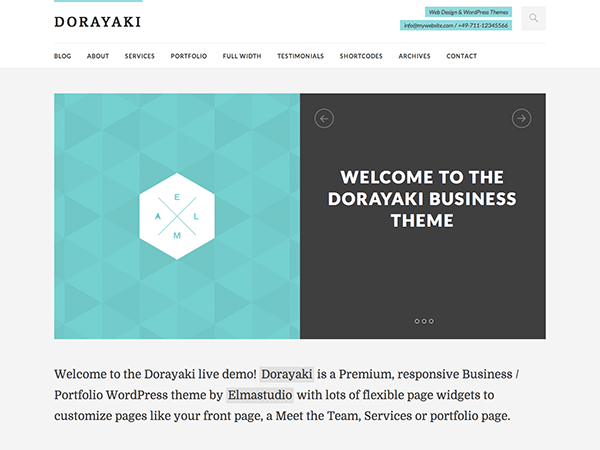
Dorayaki is a responsive, minimal Business/Portfolio WordPress theme designed for professionals and businesses looking to create a strong online presence. It offers a custom front page and widget for pages options, allowing users to easily create custom pages like an About, Services, Portfolio, or Testimonial page. With its clean design and flexible features, Dorayaki is an ideal choice for those seeking a straightforward and effective website solution.
| Version | Author | File Size | License | Requires WordPress | Tested up to | Requires PHP |
|---|---|---|---|---|---|---|
| 1.0.13 | Elmastudio | 0.43 MB | GNU General Public License v2 or later | WordPress | Tested up to | Requires PHP |
What Makes Dorayaki Stand Out
Custom Front Page
Dorayaki’s custom front page allows users to create a unique and engaging landing page that showcases their business or portfolio. With its flexible layout options, users can easily add or remove sections to suit their needs.
Widget for Pages Options
The theme’s widget for pages options enables users to create custom pages with ease. This feature is particularly useful for creating About, Services, Portfolio, or Testimonial pages that require a specific layout and content.
Slider Option
Dorayaki’s slider option allows users to add a visually appealing slider to their website. This feature is ideal for showcasing important content, such as featured projects or services.
Beautiful Blog Template
The theme’s beautiful blog template provides a clean and modern design for bloggers. With its responsive layout and easy-to-use interface, users can create and manage their blog posts with ease.
Custom Page Templates
Dorayaki offers custom page templates for full-width pages or a blog archive. These templates provide users with flexibility and control over their website’s layout and design.
Who Should Use Dorayaki?
- Freelance designers building client portfolios
- Small businesses looking to establish an online presence
- Bloggers seeking a clean and modern design
- Entrepreneurs who need a flexible and customizable website solution
What’s Included
- The Dorayaki theme ZIP file (version 1.0.13)
- Documentation link for easy setup and customization
- Version information and changelog
- License information (GNU General Public License v2 or later)
Technical Specifications
| WordPress Compatibility | PHP Requirement | Last Updated | File Size | License Type |
|---|---|---|---|---|
| WordPress | Requires PHP | Last updated | 0.43 MB | GNU General Public License v2 or later |
How to Install
- Download the Dorayaki theme ZIP file
- Log in to your WordPress dashboard and navigate to the Themes section
- Click the “Add New” button and select “Upload Theme”
- Upload the Dorayaki theme ZIP file and click “Install Now”
- Activate the theme and begin customizing your website
Download Dorayaki 1.0.13
0.43 MB | GNU General Public License v2 or later | Free Theme
Direct download • No registration required • Instant access
Frequently Asked Questions
What is the license type for Dorayaki?
Dorayaki is distributed under the GNU General Public License v2 or later.
Can I use Dorayaki for commercial purposes?
Yes, Dorayaki can be used for commercial purposes, as it is licensed under the GNU General Public License v2 or later.
How do I customize the theme’s layout and design?
The theme’s layout and design can be customized using the WordPress dashboard and the theme’s built-in options.
Is Dorayaki compatible with the latest version of WordPress?
Dorayaki is compatible with the latest version of WordPress, but it is always recommended to check the theme’s documentation and compatibility before updating your WordPress version.
Dorayaki is distributed under the GNU General Public License v2 or later license. This download is provided as-is for convenience. We are not affiliated with the original author.
Share Now!
Related Products


Popular & Trending

Featured Products
No posts were found.