
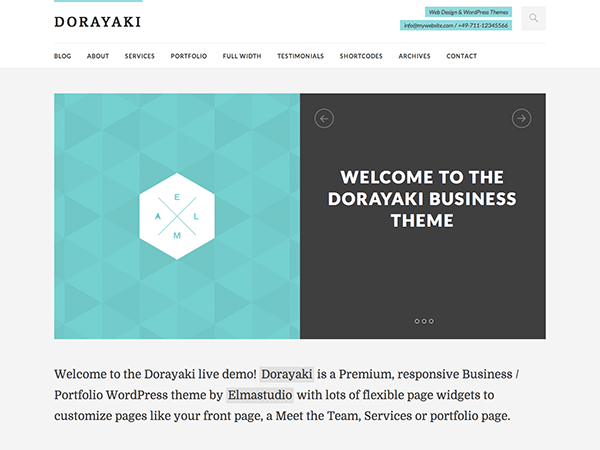
Looking for a simple yet powerful WordPress theme to elevate your online presence? Look no further than the Dorayaki theme, a responsive and minimal Business/Portfolio theme that allows you to create custom pages with ease. To get started, you can download Dorayaki free wordpress theme and explore its features.
What is Dorayaki?
Dorayaki is a WordPress theme designed by Elmastudio, a renowned theme author. It is a responsive and minimal theme, making it perfect for businesses and portfolios. With its custom front page and widget options, you can create custom pages like About, Services, Portfolio, or Testimonial pages.
The theme is compatible with the latest version of WordPress, ensuring a seamless user experience. Whether you’re a beginner or an experienced user, Dorayaki’s intuitive interface makes it easy to navigate and customize.
As a WordPress Theme, Dorayaki is designed to work seamlessly with the platform, providing a hassle-free experience for users. With its custom-header and custom-menu options, you can personalize your website to suit your brand.
Key Features of Dorayaki
- Custom Front Page: Create a unique front page that showcases your brand and services.
- Widget Options: Add widgets to your pages to enhance their functionality and appearance.
- Responsive Design: Ensure that your website looks great on all devices, from desktops to mobile phones.
- Minimal Design: Enjoy a clean and minimal design that puts your content front and center.
- Slider Option: Add a slider to your website to showcase your products or services.
- Beautiful Blog Template: Create a stunning blog that showcases your content in a visually appealing way.
- Custom Page Templates: Choose from a range of custom page templates to suit your needs.
- Optional Footer Widget Area: Add widgets to your footer to enhance your website’s functionality.
Why Choose Dorayaki?
Easy to Use
Dorayaki is designed to be user-friendly, making it easy for you to create and customize your website. With its intuitive interface, you can navigate and personalize your website with ease.
Highly Customizable
The theme offers a range of customization options, including custom headers, menus, and page templates. This allows you to personalize your website to suit your brand and needs.
Responsive and Mobile-Friendly
Dorayaki is fully responsive and mobile-friendly, ensuring that your website looks great on all devices. This is essential for providing a good user experience and improving your website’s search engine rankings.
Regular Updates and Support
As a WordPress theme, Dorayaki receives regular updates and support from its author, Elmastudio. This ensures that your website remains secure and up-to-date with the latest features and technologies.
Requirements
- WordPress: +
- Tested up to: +
- PHP: +
- License: GNU General Public License v2 or later
How to Install Dorayaki
- Download the Dorayaki theme using the button below.
- Log in to your WordPress dashboard and navigate to the Themes section.
- Click the “Add New” button and select “Upload Theme”.
- Upload the Dorayaki theme file and click “Install Now”.
- Activate the theme and start customizing your website.
Download Dorayaki 1.0.13 Free
Click the button below to get the latest version of Dorayaki completely free.
Dorayaki
v1.0.13 | 0.43 MB | GNU General Public License v2 or later | WordPress Theme
✅ GPL Licensed ✅ Virus Scanned ✅ 100% Free
Frequently Asked Questions
What is the latest version of Dorayaki?
The latest version of Dorayaki is 1.0.13. You can download it for free using the button above.
Is Dorayaki compatible with the latest version of WordPress?
Yes, Dorayaki is compatible with the latest version of WordPress. It is designed to work seamlessly with the platform, providing a hassle-free experience for users.
Can I customize the Dorayaki theme?
Yes, the Dorayaki theme is highly customizable. You can personalize your website using the theme’s custom headers, menus, and page templates.
In conclusion, Dorayaki is a powerful and flexible WordPress theme that can help you create a stunning website. With its range of features and customization options, you can personalize your website to suit your brand and needs. So why wait? Download Dorayaki free wordpress theme today and start building your online presence.

Disclaimer: Dorayaki is distributed under the GNU General Public License v2 or later license.
This post is for informational purposes only.
We do not claim ownership of this WordPress Theme.
All rights belong to the original author, Elmastudio.